

Walk into thousands of offices, schools, warehouses, and commercial buildings across the UK and you’ll find the same thing on keyrings and lanyards:
125 kHz proximity fobs.
They’ve been the industry default for decades. They’re cheap, reliable… and trivially easy to clone using RFID Cloning.
What many facilities managers don’t realise is this:
If your system uses legacy proximity fobs, someone can copy a working credential in seconds — without touching the door, the panel, or the software.
No alarms. No forced entry. No visible sign anything happened.
Just a cloned fob… and a person walking through the front door.
Why legacy RFID cards are so easy to copy
Older technologies such as:
- HID Prox (125 kHz)
- EM4100 / EM4200
- Early MIFARE Classic cards
all share the same flaw:
They transmit a fixed, unencrypted ID number.
A handheld copier (widely available online for a small cost) can:
- Read that number wirelessly from a pocket or lanyard
- Write it onto a blank fob
- Create a fully working duplicate in under 30 seconds
This isn’t “hacking” in the Hollywood sense.
It’s more like photocopying a barcode.
The uncomfortable truth about many sites
Two buildings can have identical readers and software.
- One is secure
- One can be bypassed by a cloned fob in seconds
The difference is the credential technology, not the brand of access control.
And during takeovers, upgrades, or maintenance, this is rarely audited.
How mobile credentials change the game
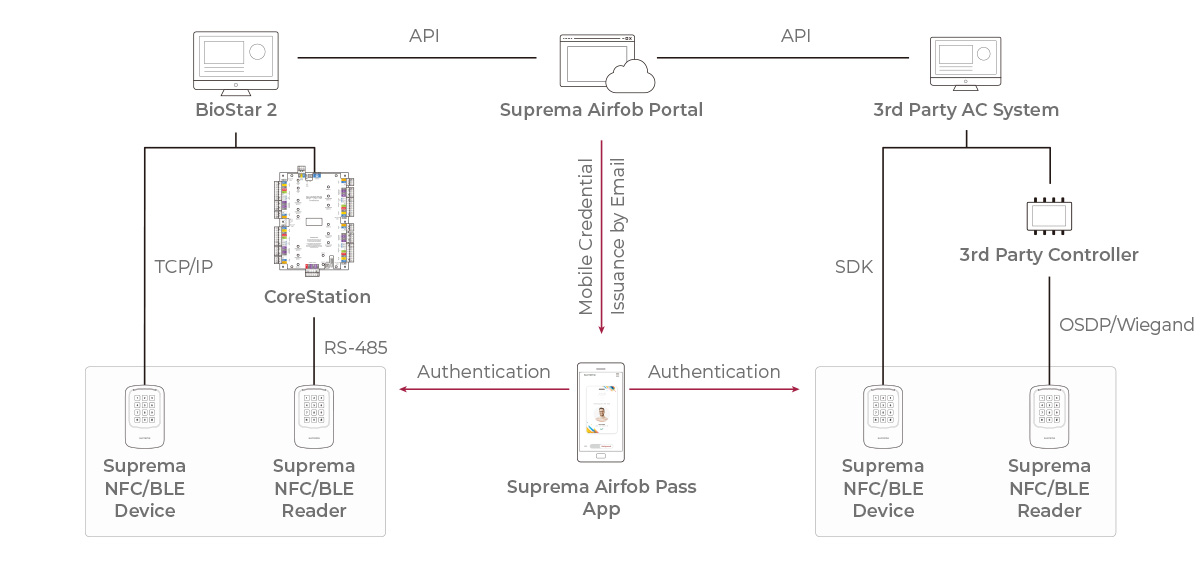

Modern mobile access, such as the system from Suprema, works in a completely different way.
With Suprema Mobile Credential:
- The phone is not acting like a card
- Communication uses encrypted BLE or secure NFC
- There is no static ID to read or copy
- Each interaction uses cryptographic challenge–response
- Credentials are stored in the phone’s secure hardware enclave (the same protection used for Apple Pay / Google Pay)
When the reader asks for proof, the phone proves its identity without revealing any secret.
There is nothing to skim. Nothing to clone. Nothing to replay.
The “weakest credential” problem
Many sites install modern readers capable of high security… but still issue old fobs alongside mobile access.
If a user can open the door with:
- Their smartphone or
- A cheap 125 kHz fob
The site is still vulnerable.
Your security is defined by the weakest credential in circulation.
What a secure setup looks like
A genuinely secure modern access setup uses:
- Mobile credentials for staff
- Secure smart cards (e.g. DESFire) only where needed
- No legacy proximity fobs in use
At that point, the common real-world cloning attack path is completely removed.
Why this is one of the highest-impact upgrades you can make
Upgrading readers, controllers, or software can be expensive and disruptive.
Moving from cloneable fobs to secure mobile credentials often requires none of that — just a change in how credentials are issued.
Yet it removes the single most common method used to bypass access control in real buildings.
The bottom line
| Credential type | Can it be cloned? | Risk level |
|---|---|---|
| 125 kHz proximity fobs | Yes — in seconds | 🔴 Severe |
| MIFARE Classic | Yes — with tools | 🟠 High |
| Secure smart cards (DESFire/iCLASS SE) | No | 🟢 Very low |
| Suprema Mobile Credential | No | 🟢 Extremely low |
If you’re still issuing legacy fobs, your doors may be far easier to open than you think.
Mobile credentials don’t just add convenience.
They remove an entire class of security vulnerability from your site.
Want to know if your current system is at risk?
Audit the type of cards and fobs in circulation — not just the readers on the wall.
That’s where the real story is.